 FEXLINK Research Institute
The short answer
A design is seldom blocked by the operations team because the technology is wrong. It is blocked because the document was written for a good presentation and the moment of acceptance, not for the people who will staff the system daily. When operations votes no, it speaks for every future night shift, every duplicate alarm, and every handover where nobody can say who owned the action. Checking 4 recurring objections before review, and bringing users into the design stage, achieves far more than adding a slide of features. What follows is a self-check method, not a new architecture.
What gets rejected is the design, not the technology
In technical review, point coverage, communications, platform functions and reporting dimensions all have answers. Then, at a review where the eventual users are present, someone from operations says "we cannot work with this", and the design stalls. The team tends to blame technical ignorance or resistance to change. Neither explains why the same people often accept a design with fewer features that fits the shift.
The two reviews ask different questions. A technical review asks whether the system can do something. Operations asks who will use it daily, who carries the risk when it is wrong, and whose workload absorbs the extra steps. Those questions are usually absent from the requirement document, yet they are honoured every day after go-live. A design that never answers them leaves the cost with the user, then asks that user to sign off on it.
"Veto" describes a review-room phenomenon, not a written rule in any organisation. The useful question is why the people who will operate the system first see the design at the review meeting.
The 4 real objections
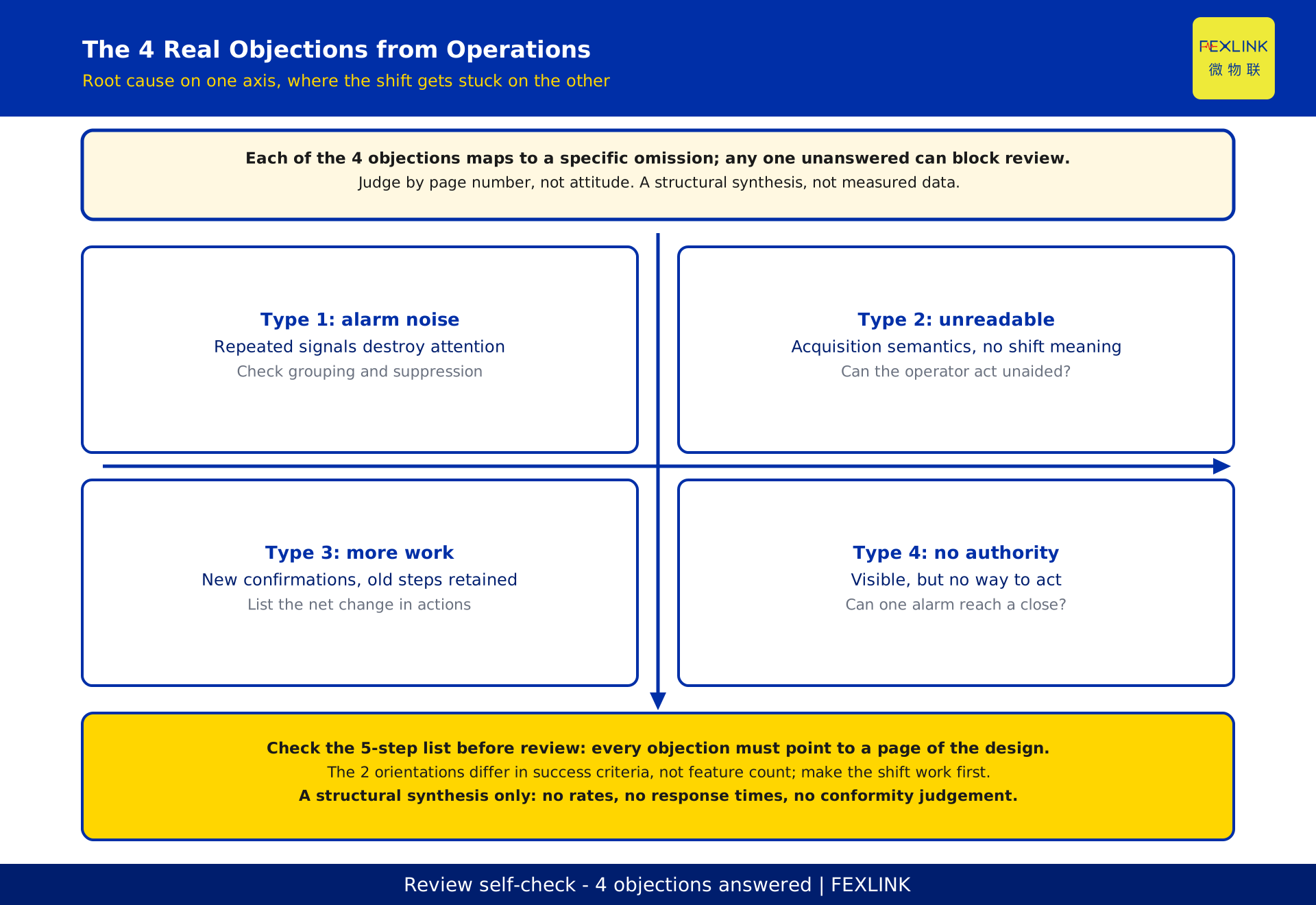
Set the objections out and 4 types keep appearing at design level. None is a matter of attitude. Each maps to a specific omission.
| Type | What operations says | What the design omits | Check |
|---|---|---|---|
| Type 1: alarm noise | "By the time something real happens, we stopped watching that screen" | No grouping rule, no suppression condition, no severity tiers | How do repeated signals from one asset collapse into one item? |
| Type 2: unreadable | "What does this code mean, and which table do I look it up in?" | Acquisition semantics only, no shift semantics | Can the operator say what to do without a manual? |
| Type 3: more work | "One round used to be enough; now I click through three screens as well" | New logging, confirmation and write-back steps without removing old ones | List the net change in actions |
| Type 4: no authority to act | "I can see it, but I have no permission, no work order, no contact" | Design stops at the alarm, never reaching action and closure | Can one alarm reach a confirmed close? |
The 4 types have an order: noise destroys attention, unreadable content stops alarms becoming action, extra work pushes people back to the old routine, and no authority leaves the system visible but unusable. Fixing one rarely changes the outcome; leaving any one unanswered is enough to block. These are a synthesis of recurring objections, not a survey result, and carry no occurrence rates, false alarm rates or response times. Such figures depend on site equipment and shift rules; writing them in without that context would be invention.
Two orientations: presentation design and operations design
The same feature list can be written toward 2 different ends. Distinguishing them is not a criticism of reporting upward, which is necessary. It is a reminder that the 2 orientations define success differently, and that an undeclared mixture will be measured by the operations yardstick at review.
| Dimension | Presentation design | Operations design |
|---|---|---|
| Goal | Let decision makers see what was built | Let the operator make one fewer judgement |
| Success | Review passed, acceptance signed | Used daily, alarms closed |
| Screen focus | Overview, wall displays, statistics | Current state, pending items, action entry |
| Alarms | All of them shown, counts available | Grouped and tiered, pointing to an action |
| Acceptance | Feature-by-feature demonstration | Walk through a real shift scenario |
| Where complexity lands | After go-live | In the design stage |
Most projects deliver both, but the order matters: get the shift workflow working first, then build the reporting view on top.
Why designing for the acceptance moment plants a defect
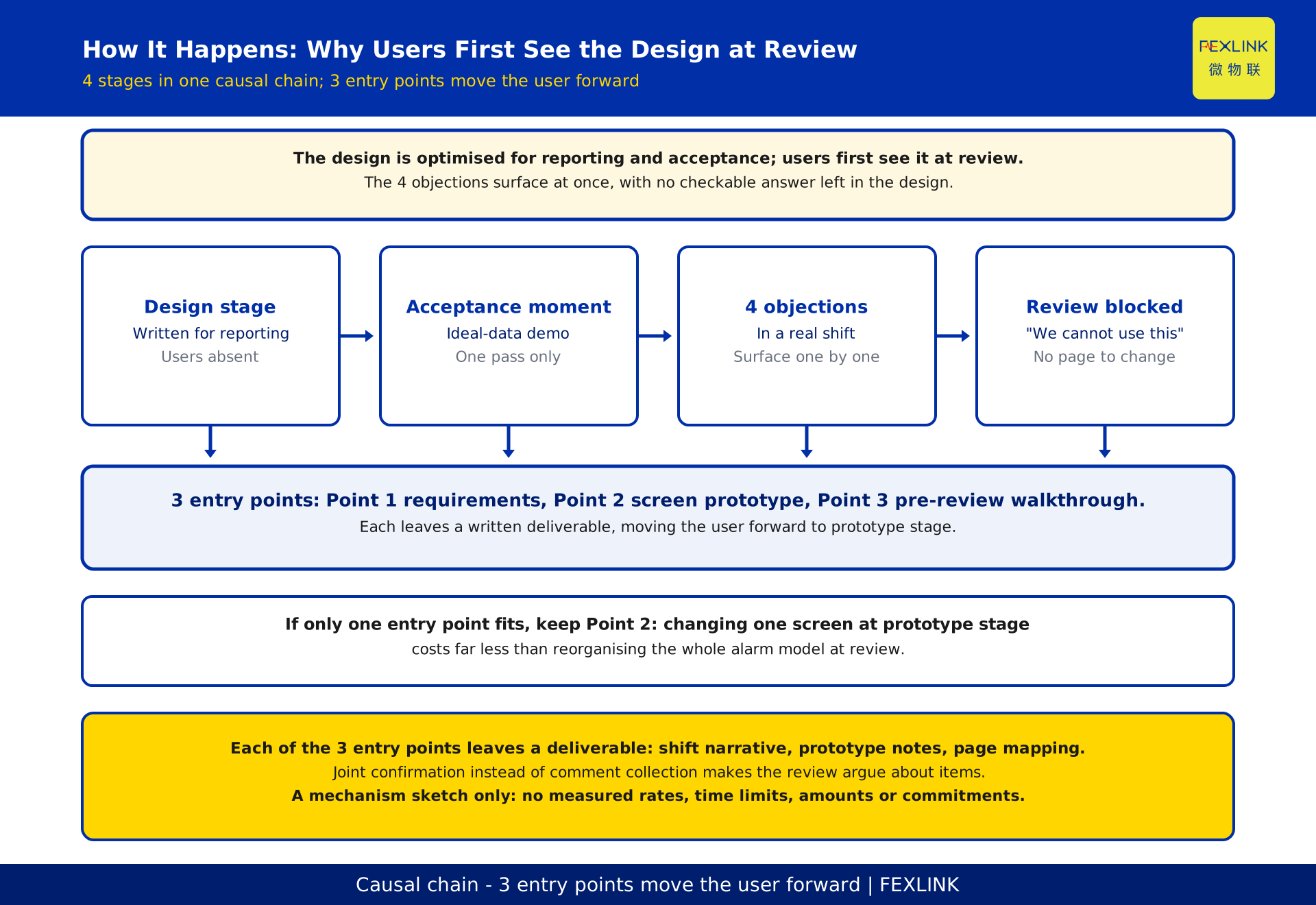
The root cause is a mismatch of time horizons. A design is optimised for one-off events — the review, the acceptance meeting, the report — while operations lives with repetition: the same night shift, the same class of signal, the same handover. A one-off view prefers demonstrable breadth; a long-term view cares only about recurring burden: clicks per shift, time per decision, who to call when it goes wrong.
Two blind spots follow: generating an alarm is treated as the finish line, so nobody specifies who picks it up or who confirms the result; and the old process is never removed, so new confirmation steps pile onto existing logs, paper records and phone calls as a net increase in work. None of this surfaces at acceptance, where demonstrations use ideal data, are operated by the builders, and run once. It appears on the second night shift or the first genuine anomaly, by which time the design team has left.
Bringing users into the design: 3 entry points
"Involve operations early" is too vague to act on. The workable version splits it into 3 entry points, each with a deliverable.
| Entry point | Who attends | Material to bring | What you leave with |
|---|---|---|---|
| Point 1: requirements | Shift lead, keeper of the handover log | Recent shift task list, existing anomaly records | One shift described back in the user's own words |
| Point 2: screen prototype | The person who will actually touch the screen, not only a delegate | Clickable static prototype, one real alarm sample | Where they would click, who they would call, what they would enter |
| Point 3: pre-review walkthrough | The user representative with blocking authority | Full design, grouping rules, action path | Each of the 4 objections tied to a page that answers it |
Two mistakes are common: collecting a department head's signature without meeting the person on the shift, and treating involvement as comment collection rather than joint confirmation. If the schedule allows only one of the 3 points, keep Point 2: changing a screen at prototype stage costs far less than reorganising the alarm model at review.
Screens and alarm grouping: 3 design points
Each of the 3 points demands a checkable statement rather than an adjective.
Point 1: one screen, one state. The main operator screen answers one question: do I need to act now. The state requiring a decision takes the primary position; statistics move to a secondary page. The test: an operator can say whether anything is pending without switching tabs.
Point 2: group by asset and action, not by signal. Signals pointing to the same action collapse into one pending item, with raw signals retained for traceability. The rule must be written into the design and given a named owner; "supports intelligent grouping" says nothing. No counts, thresholds or time windows belong here, since those must come from the site asset list and shift rules.
Point 3: every alarm carries its action and its write-back. The card needs the next action, the responsible role and the confirmation method, and the outcome returns to the same record. Without write-back, the system records only that something once sounded; it cannot answer what happened afterwards.
The action path: from one alarm to one closed loop
Grouping settles what is seen; the action path settles what happens next, across 3 responsibility boundaries.
Segment 1 is receipt: who counts as having accepted the alarm and when, and whether night and day shifts use the same role. Segment 2 is action: which steps an operator may take, which must escalate, and how on-site and remote handling are recorded; permissions belong here, since "visible but no way to act" is the source of the Type 4 objection. Segment 3 is write-back: who records the outcome, how it links to the original alarm, and who confirms closure, turning an alarm that "sounded" into one that "closed". Join the 3 segments into one path and walk a real alarm sample through it end to end; most "no authority to act" problems surface before review.
A 5-step self-check before review
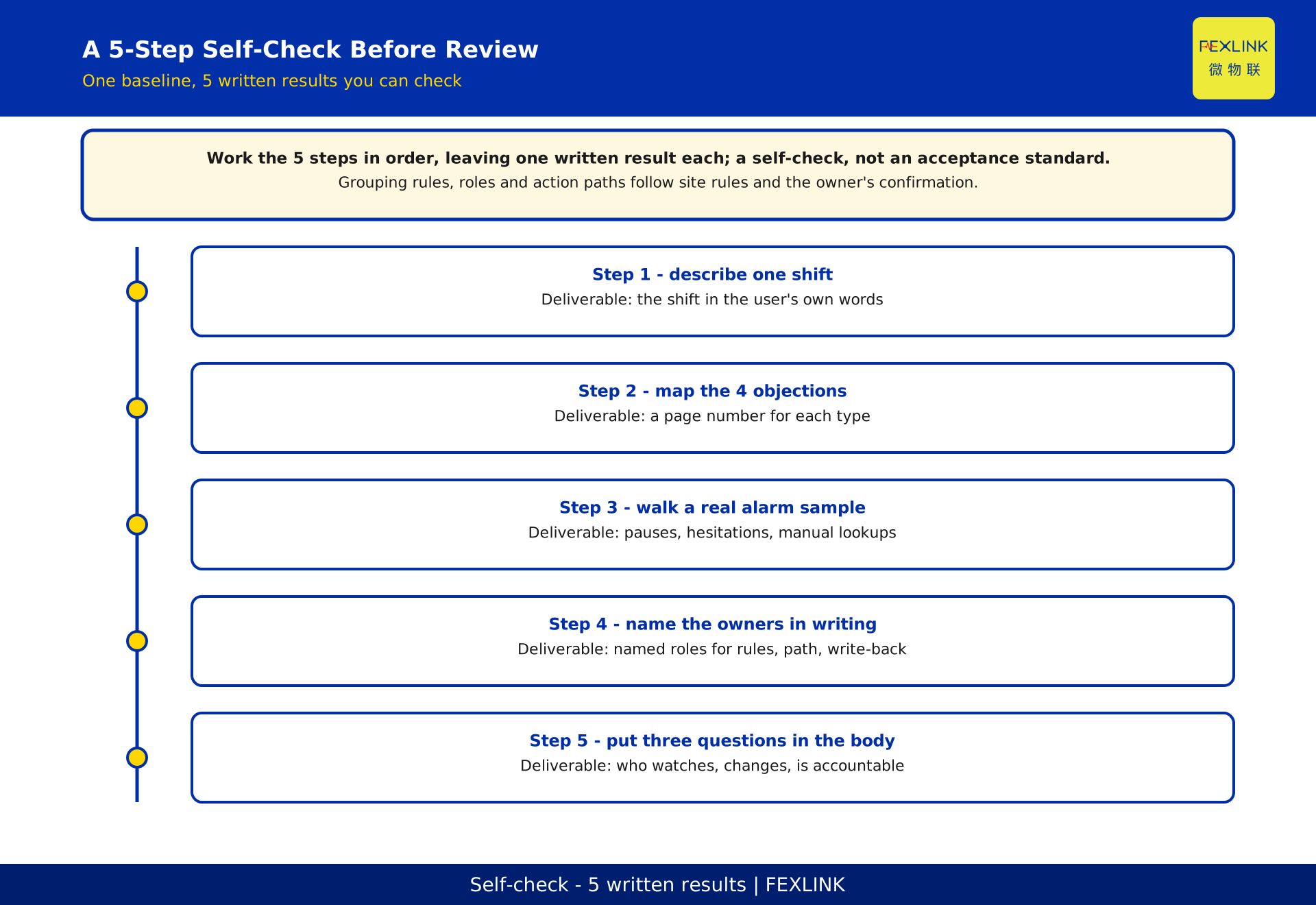
Work through the 5 steps in order, leaving one written, checkable result for each. This is a design self-check, not an acceptance standard, and it replaces no existing review process.
Step 1: Find the person who will actually staff the system and ask them to describe one shift in their own words. If that description does not match the roles in the design, change the design first.
Step 2: Write, for each of the 4 objections, which page of the design answers it. Where no page can be named, add design rather than wording.
Step 3: Walk one real alarm sample through the operator screen, without demo data and without the designer operating it. Record every pause and every manual lookup.
Step 4: Confirm that grouping rules, the action path and write-back fields each have a named owner in writing. "To be maintained by operations later" counts as unfinished.
Step 5: Put "who watches it, who changes it, who is accountable" in the body of the design, not an appendix. If those three questions have no names and no roles, the user has not really entered the design.
A desensitised scene: a site distribution duty room
A site's distribution duty room was preparing a monitoring upgrade, with the first design built around overview dashboards and reports. At the Point 2 prototype walkthrough, the operator raised three things: several signals from the same cabinet popped up in sequence; the pop-up showed a point code requiring a lookup table; and he did not know whom to call or whether to record it elsewhere.
Those map to Type 1, Type 2 and Type 4. The fix added no features: signals pointing to the same action collapsed into one pending item; the main screen opened with whether anything was pending; every item carried an action, a role and a write-back; statistics moved to a secondary page. A pass through the 5-step checklist left one open disagreement, over who could confirm closure, settled by naming a person in the meeting. No before-and-after counts, durations or effect ratios are given, and no real customer is represented: an objection usually asks for the features already there to be organised into a shift action.
Frequently asked questions (FAQ)
Q: Is the operations team just avoiding responsibility when it objects?
Treat it as deflection and the design gains one page of "training plan". The user alone lives with the system's side effects daily; translating objections into an action list is the designer's job.
Q: The design already passed technical review. Do we really need operations to look again?
Yes, and not at the same material. Technical review confirms what the system can do; a walkthrough confirms how it will be used. Point 2 of the 3 entry points brings this forward to prototype stage.
Q: Will alarm grouping swallow a genuine alarm?
Grouping is conditional on one asset, one period and one action, with raw signals retained for traceability. The rule must be written down, owned by a named role, and walked through on a real sample. Without that, the risk is real.
Q: Won't user requests expand the scope indefinitely?
Joint confirmation rather than comment collection is the control. Every request must map to one of the 4 objections and to a page of the design; anything that does not goes on a deferred list. The owner decides scope changes against written items.
Q: Can the 5-step checklist be used as acceptance clauses?
No. It is a pre-review self-check, not acceptance clauses. Those must be set separately by the owner against site shift rules, contract scope and formal requirement documents; this article supplies no clause text and makes no conformity judgement.
Scope and limitations
This article addresses design alignment at review stage: why a design is blocked for not being written for its users, and how to self-check before submission. It does not cover a system falling idle after go-live or continuing operations, which belong to a later stage.
The 4 objections, 2 orientations, 3 entry points, 3 design points and 5 steps are structural syntheses, not survey findings, and carry no occurrence rates, false alarm rates, response times, count thresholds or performance commitments. Numbers here count categories and steps only; they are not measured data. No standard numbers, years, clause references or conformity judgements appear, and no product models or parameters are specified. The associated system named in the registry is a name only, not a selection recommendation.
"Veto" describes a review-room phenomenon, not a written rule in any organisation. The scene is desensitised and generic, with no client name, location or inferable scale, and represents no real customer outcome. Actual grouping rules, roles, screen fields and action paths must follow the site asset list, shift rules, formal requirement documents and the owner's confirmations. This checklist replaces none of them, nor independent review and acceptance. This is a draft pending independent QA and owner review.
Frequently Asked Questions
Why Your Design Keeps Getting Shot Down by the Operations
A design is seldom blocked by the operations team because the technology is wrong