 FEXLINK Research Institute
The short answer
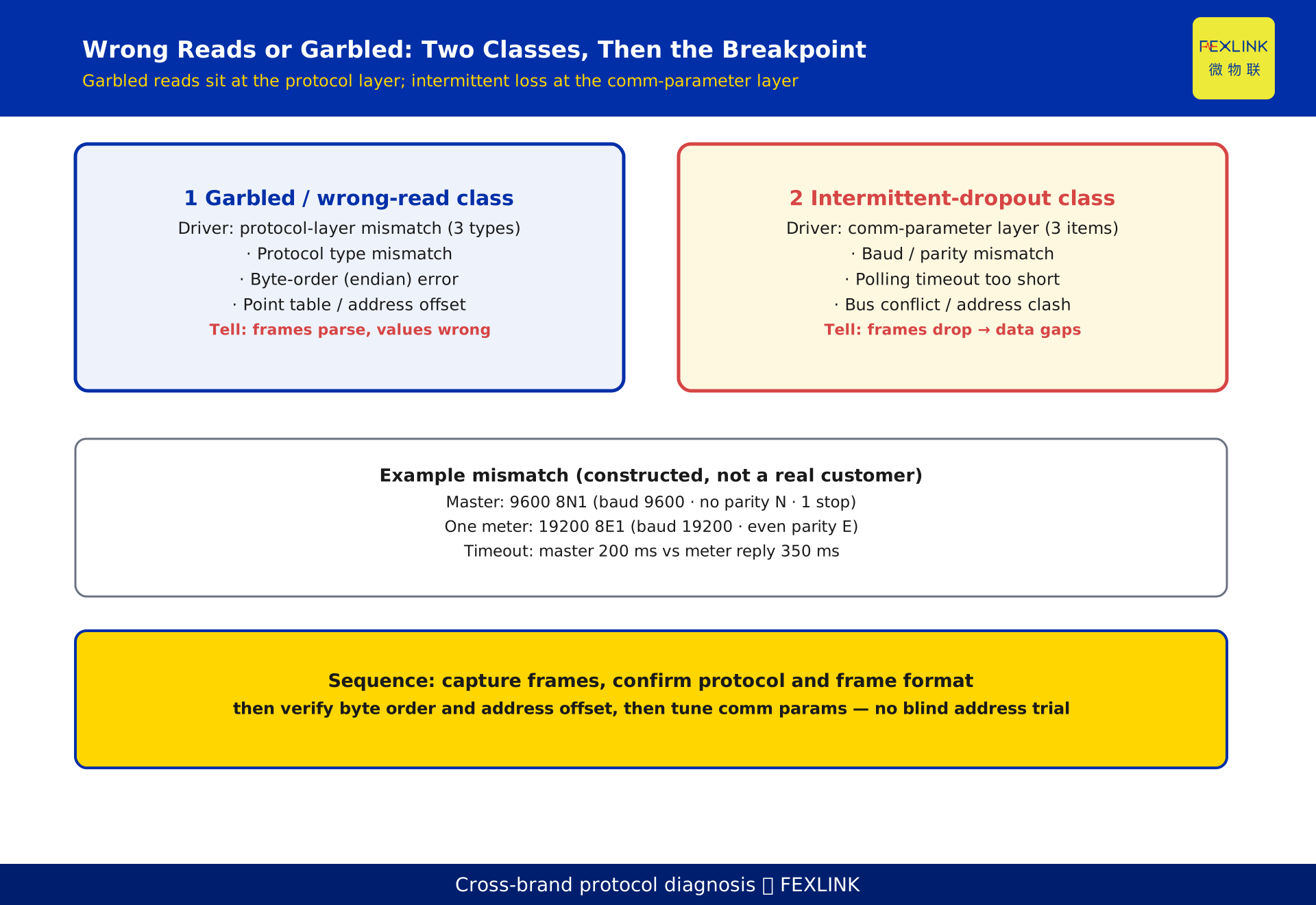
When a third-party meter is connected but reads wrong or intermittently, you are usually looking at two different faults. If frames arrive but the values are garbled, the break is in the protocol layer — mismatched protocol type, byte order, or register address/function code. If frames come and go and the data stream has gaps, the break is in the comm-parameter layer — baud/parity mismatch or too short a polling timeout. Diagnose in this order: capture frames and confirm the protocol and frame format first, then verify byte order and the point table, and only then touch the comm parameters. Do not start by blindly guessing register addresses.
1. Two failure classes, two root layers
Cross-brand integration most often stalls at "connected but wrong": the link LED is on, the serial port has data, yet the platform shows either a string of garbage, a value that is obviously absurd, or a drop every few minutes. The instinct is to change the address for the first symptom and to re-wire for the second — which usually makes things worse.
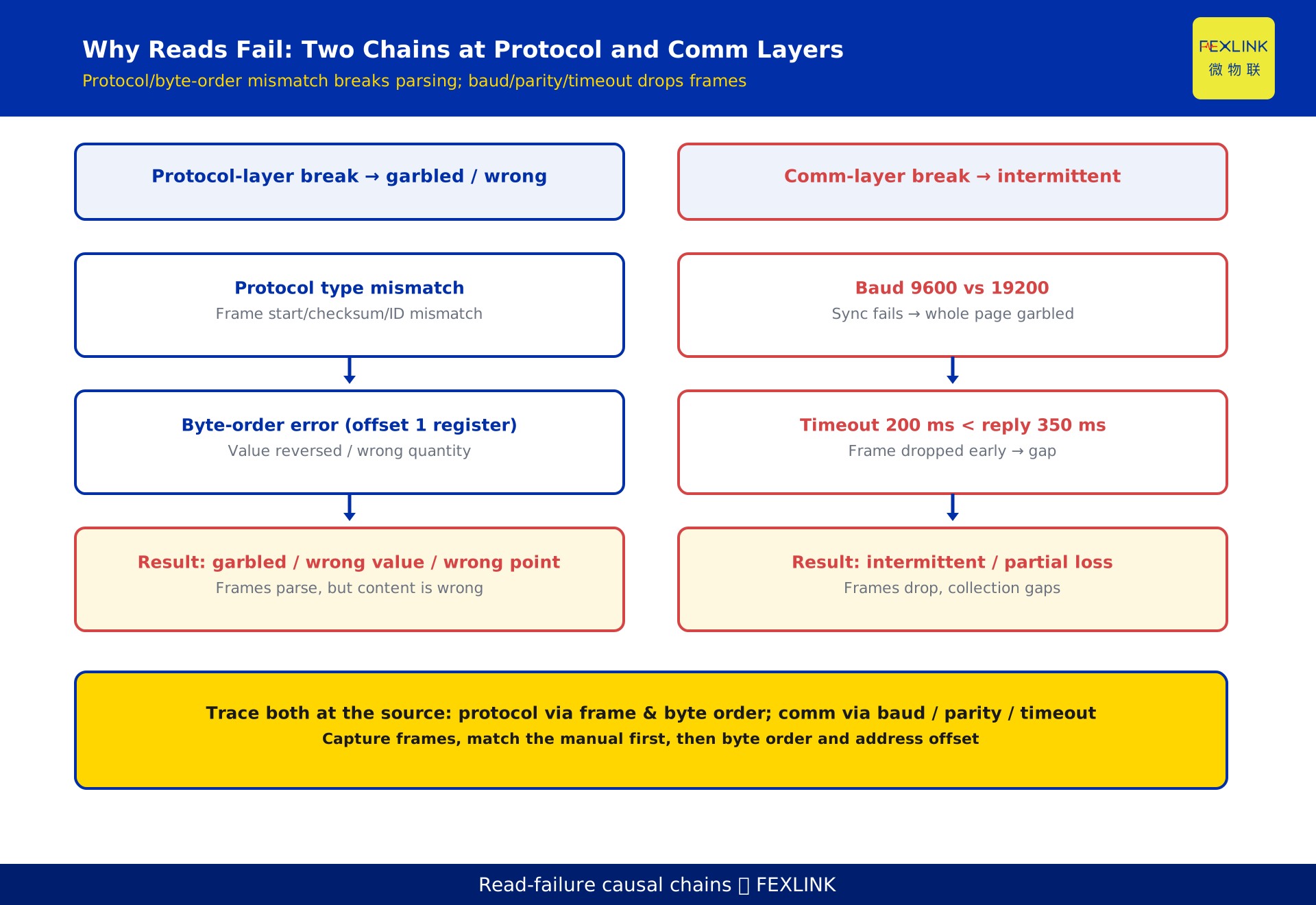
Strip the symptoms down and there are only two causal chains. One sits in the protocol layer: frames get through and parse, but the content is wrong — that is the "garbled / wrong-read" class. The other sits in the comm-parameter layer: the frame itself is correct, but it frequently arrives incomplete or is dropped — that is the "intermittent-dropout" class. The first diagnostic step is to decide which class you have, because that decides whether you chase the protocol or the baud rate.
2. Garbled reads: protocol-type mismatch
The most common and most overlooked cause is that the master and the meter are simply not speaking the same protocol. The platform decodes a meter as Modbus RTU while the meter actually runs DL/T 645; or both claim "Modbus" but one is standard Modbus and the other is a vendor-private "Modbus variant" with completely different register meaning.
The result is that the frame start, length field, checksum, and data identifiers do not line up, so the parsed byte string is meaningless garbage, or an entire page of values flips. The tell is simple: the frame is there but the content is never right. Do not touch the address yet — capture one frame and check its header and data identifiers against the protocol manual. DL/T 645, the multi-meter communication protocol standard, defines frame structure and data identifiers across vendors, so the first question in any cross-brand job is whether both sides are truly on the same protocol.
3. Garbled reads: byte-order (endian) error
Even with the protocol agreed, a 16-bit or 32-bit register value still carries the question of "high byte first or low byte first." Take a 32-bit cumulative energy value: the master parses it big-endian (high byte first) while the meter sends it little-endian (low byte first), and what you read is a number of a completely different magnitude — it looks like "the wrong quantity."
This error is the most hidden: the frame parses perfectly and the checksum passes; only the value is flipped. The only way to locate it is to take a known, dimensioned real value from the same register and compare it against the master's and the meter's respective endian conventions, confirming which of the 2 byte orders is in play. Many "off by tens of thousands" mysteries trace back to exactly this one bit of ordering.
4. Garbled reads: point-table and address-offset
With byte order correct, the next trap is the address offset. Vendors disagree on register base: some count the first register as 0, others as 1. Feed a 0-based point table to a 1-based meter and every reading shifts by one register, scrambling the dimensions.
A second sub-case is misaligned function code and dimension: the point table says "total active energy" maps to function code 04H, but the meter only supports 03H, or the unit is actually hundred-var-hours but is interpreted as kilowatt-hours. The tell is "there is a number, but it is wrong," with a regular pattern of "everything shifted one slot." Check the address base (0 or 1) and the function code line by line against the manual — far more efficient than trial-and-error on addresses.
5. Intermittent loss: baud / parity mismatch
Unlike the garbled class, intermittent problems usually live not in the protocol but in the physical serial parameters. The classic case is the master and meter not sharing the same UART settings. For example, the master is set to 9600 8N1 (baud 9600, no parity N, 1 stop bit), while one meter actually runs 19200 8E1 (baud 19200, even parity E).
A 2x baud difference breaks frame synchronization, presenting as large blocks of garbage mixed with whole pages that will not read; a parity mismatch makes the receiver discard the entire frame on checksum failure. The captured frames show it clearly: not wrong content, but "good one moment, missing the next." Align the two sides' serial parameters and it usually recovers immediately.
6. Intermittent loss: polling timeout too short
The second common cause is a polling timeout set too tight on the master. Using the example parameters: the master allows 200 ms for a single-frame reply, but the meter actually needs 350 ms. The frame is still being returned when the master already declares a timeout and discards it, so the collection curve shows gap after gap — it looks "intermittent."
The rule of thumb: the timeout should be no less than 3x the single-frame reply time. In the example above, a 350 ms reply needs at least 1050 ms of timeout headroom. Raise the timeout to at least 3x the single-frame reply and the gaps usually vanish. Note that these parameters are constructed to illustrate the point and represent no real customer.
7. Intermittent loss: bus conflict and address clash
The third class is at the RS485 bus level. When several meters share one bus and two of them are set to the same slave address, the master is effectively calling the same name on one wire — both answer, neither answers completely, and frames drop at random. Or the bus lacks its termination resistor or has over-long stubs, and signal reflection causes sporadic bit errors that show up as intermittent "partial loss."
The tell: the dropping meter is not fixed, it appears randomly over time, and it clusters in multi-meter shared-bus setups. The priority is to confirm every meter's slave address is unique, then check the bus termination and wiring. These are fixed by re-addressing or adding termination — unrelated to protocol content.
8. A five-step debugging method
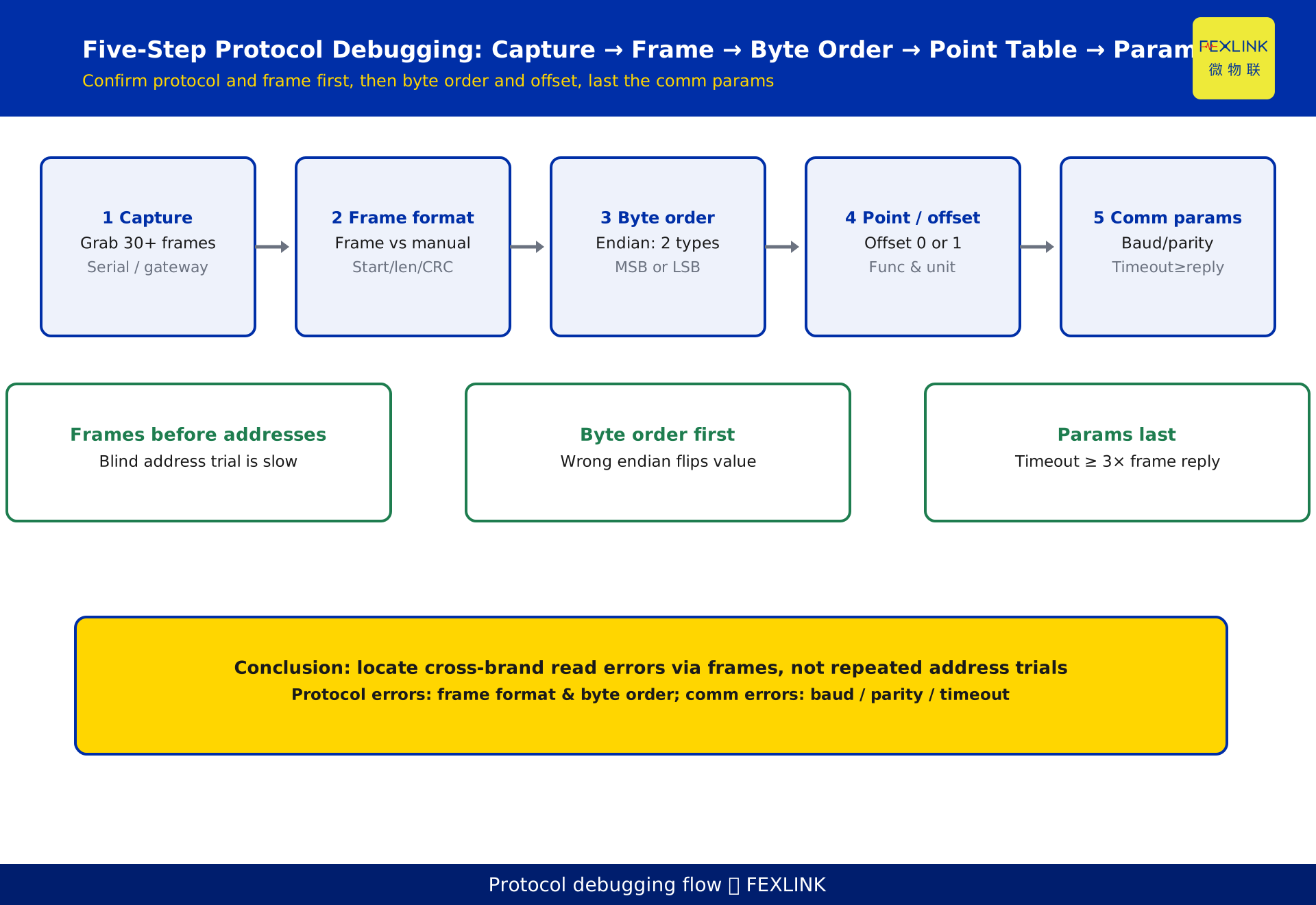
Roll the traps above into one executable path, and work it in order rather than editing register addresses up front:
Step 1, capture frames. Use a serial assistant or gateway to grab at least 30 frames, covering both normal and abnormal moments. Step 2, check the frame format. Match those 30 frames against the protocol manual — start, length, checksum. Step 3, verify byte order. Confirm which of the 2 endian types the meter uses. Step 4, check the point table and address offset. Confirm the base is 0 or 1, and that function code and dimension align. Step 5, only now tune comm parameters: baud, parity, and timeout (no less than 3x the single-frame reply).
The order cannot be reversed: frames before addresses, byte order before values, parameters last. Teams that spend two days trial-and-error on addresses often have a baud mismatch underneath — wrong order, terrible efficiency.
9. How products close the loop
Integration is not an engineer hand-typing frames; it lands in a system through devices and a platform. On site, meters of different brands and protocols are typically consolidated onto one FG-0221-ER protocol-conversion gateway, which performs protocol translation and normalizes serial parameters; for higher-density or edge-computing points, ESX-0223-GR extends the access layer.
Above that, the Taiyi central-control L1 access layer (40+ protocol parsing) performs unified parsing, modeling, and cleaning, digesting the dirty data — protocol mismatch, byte-order error, point-table offset — at the access layer so the platform only sees clean quantities. The important caveat: the gateway and the central-control layer solve "protocol translation," but they cannot solve the physical-layer problem of "the meter's own baud/parity is mispaired." That still has to be fixed on site by aligning the serial parameters.
10. Where this article stops
To avoid overlap, this article covers only the protocol-layer diagnosis of cross-brand "wrong-read / garbled" data, and draws a clear line against its neighbors: KD-0504 explains how a new meter gets brought online (onboarding flow, wiring, registration) and is not repeated here — this article only covers what to do once it is connected but reads wrong; KD-0514 covers the general "going offline" problem (link layer, power supply, network) and is not repeated here — this article covers only the "connected but wrong" sub-segment. The increment of this article is precisely the localization method for three misalignment points: byte-order error, protocol mismatch, and point-table address offset.
FAQ
Q: The frames arrive but the platform shows garbage — why?
Mostly a protocol-type mismatch or a byte-order error. Frames getting through means the physical link is basically fine; garbage means the master is parsing the meter's bytes under the wrong protocol or endianness. Capture one frame, check its header and data identifiers against the manual, then confirm the endian convention — more effective than changing addresses.
Q: The value looks "present but off by many multiples" — what is wrong?
Most likely a byte-order (endian) error or an address offset (0-based vs 1-based). With opposite endian conventions the same register reads as a different magnitude; a one-slot base offset shifts every dimension. Locate it by checking line by line against a known, dimensioned real value.
Q: The meter drops every few minutes and the data is patchy — is the cable bad?
Not necessarily. First check comm parameters: are the master's and meter's baud and parity consistent, and is the polling timeout too short (it should be at least 3x the single-frame reply)? A 2x baud difference or an insufficient timeout both present as intermittent loss and usually recover once aligned; then check the bus for an address clash.
Q: Why not just try register addresses from the start?
Because the root cause of "wrong reads" is mostly in the protocol and comm-parameter layers, not in the address itself. Blindly trying addresses usually means the protocol or byte order is misaligned — try a hundred addresses and it still will not be right, while burning time. The correct order is to capture frames and confirm the protocol and frame format, then verify byte order and the point table, and only then touch parameters.
Q: Once we use a protocol-conversion gateway, do we not need to worry about this?
The gateway solves protocol translation and serial-parameter normalization, but not the physical-layer problems of a mispaired meter serial parameter or a bus address clash. The gateway is a "translator," not an "electrician"; on site you still have to align baud, parity, and slave address before the gateway can deliver clean data.
Scope and limitations
- This article addresses "wrong-read / garbled" and "intermittent" problems when RS485/serial energy meters and collectors are brought onto a platform via Modbus, DL/T 645, and similar protocols. It targets protocol-debugging engineers and system integrators doing on-site localization.
- The example parameters in this article (master 9600 8N1 vs a meter 19200 8E1, polling timeout 200 ms vs meter reply 350 ms, capturing no fewer than 30 frames, 2 byte orders, 0/1 address base, timeout no less than 3x the single-frame reply) are constructed to illustrate the problem and represent no real customer or project; actual parameters must follow the on-site device manual and measurement.
- DL/T 645, as the multi-meter communication protocol standard, is the common basis for cross-brand integration; vendor implementations of its frame structure and data identifiers may differ, and specific register addresses and data identifiers follow the device vendor's manual — this article does not fabricate specific register values.
- The products and solutions mentioned — FG-0221-ER protocol-conversion gateway, ESX-0223-GR, and the Taiyi central-control L1 access layer (40+ protocol parsing) — are related offerings; specific models, interfaces, and protocol coverage follow the latest selection manual and product knowledge base, and this article is not a selection or procurement recommendation.
- The localization method for "byte-order / protocol / point-table misalignment" applies broadly to register-read protocols such as Modbus and DL/T 645; pure transparent-transmission or privately encrypted protocols require handling against the vendor documentation.
Frequently Asked Questions
The frames arrive but the platform shows garbage — why?
Mostly a protocol-type mismatch or a byte-order error. Frames getting through means the physical link is basically fine; garbage means the master is parsing the meter's bytes under the wrong protocol or endianness. Capture one frame, check its header and data identifiers against the manual, then confirm the endian convention — more effective than changing addresses.
The value looks "present but off by many multiples" — what is wrong?
Most likely a byte-order (endian) error or an address offset (0-based vs 1-based). With opposite endian conventions the same register reads as a different magnitude; a one-slot base offset shifts every dimension. Locate it by checking line by line against a known, dimensioned real value.
The meter drops every few minutes and the data is patchy — is the cable bad?
Not necessarily. First check comm parameters: are the master's and meter's baud and parity consistent, and is the polling timeout too short (it should be at least 3x the single-frame reply)? A 2x baud difference or an insufficient timeout both present as intermittent loss and usually recover once aligned; then check the bus for an address clash.
Why not just try register addresses from the start?
Because the root cause of "wrong reads" is mostly in the protocol and comm-parameter layers, not in the address itself. Blindly trying addresses usually means the protocol or byte order is misaligned — try a hundred addresses and it still will not be right, while burning time. The correct order is to capture frames and confirm the protocol and frame format, then verify byte order and the point table, and only then touch parameters.
Once we use a protocol-conversion gateway, do we not need to worry about this?
The gateway solves protocol translation and serial-parameter normalization, but not the physical-layer problems of a mispaired meter serial parameter or a bus address clash. The gateway is a "translator," not an "electrician"; on site you still have to align baud, parity, and slave address before the gateway can deliver clean data.