 FEXLINK Research Institute
The short answer
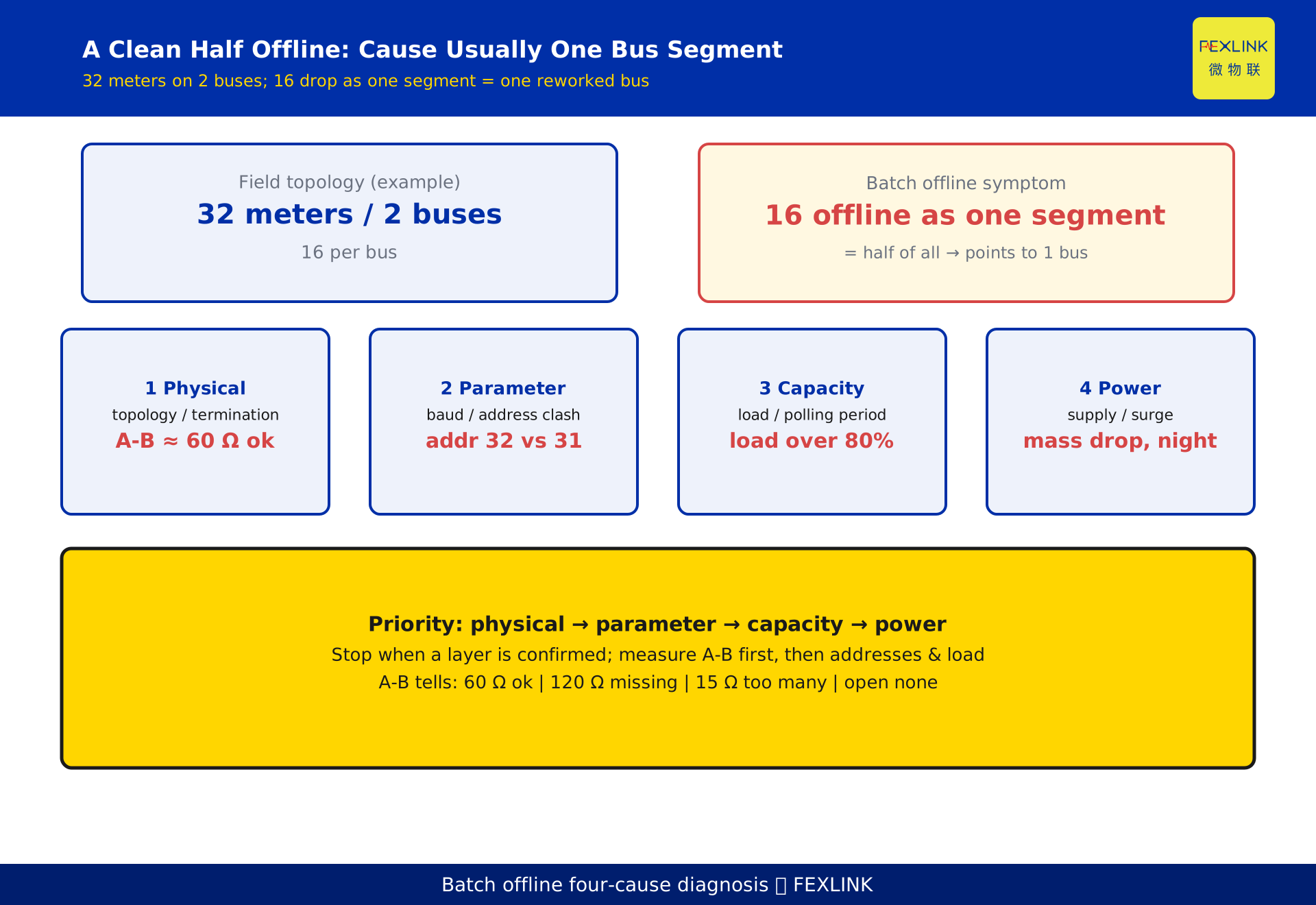
When a large batch of meters suddenly shows offline, do not rush to reboot the gateway — a reboot merely re-scans nodes already down, leaving the root cause untouched. Batch offline and single-node offline are different: a single node usually means one meter or connector, while a batch almost always means one bus segment or one address range was changed. Troubleshoot by priority across four layers: physical layer (bus topology / termination) → parameter layer (baud rate / address conflict) → capacity layer (gateway load and polling period) → power layer (supply / surge). In practice, a clean "half the meters offline" pattern more often than not means one bus segment restructured into a star branch, or a batch of meters sharing duplicate addresses. Measure the A-B resistance and inspect topology and addresses before you reboot.
1. First read the symptom: batch or single-node
The same phrase "meters offline" hides two different faults.
Single-node offline: one or two meters flap or go dead, usually a loose connection, a failed local supply, or an address changed by mistake. The fix is to replace that node; nothing else is affected.
Batch offline: a dozen meters, or a clean "half", drop together, clustered on one bus or one address range. That regularity is a strong signal — not random failure but one link or one parameter broken uniformly. The most common story: a daisy-chain bus was branched into a star during work, or new meters kept old addresses after a retrofit. For a batch, trace "which segment / which range" rather than walking meter by meter.
2. The four-cause tree, ordered by priority
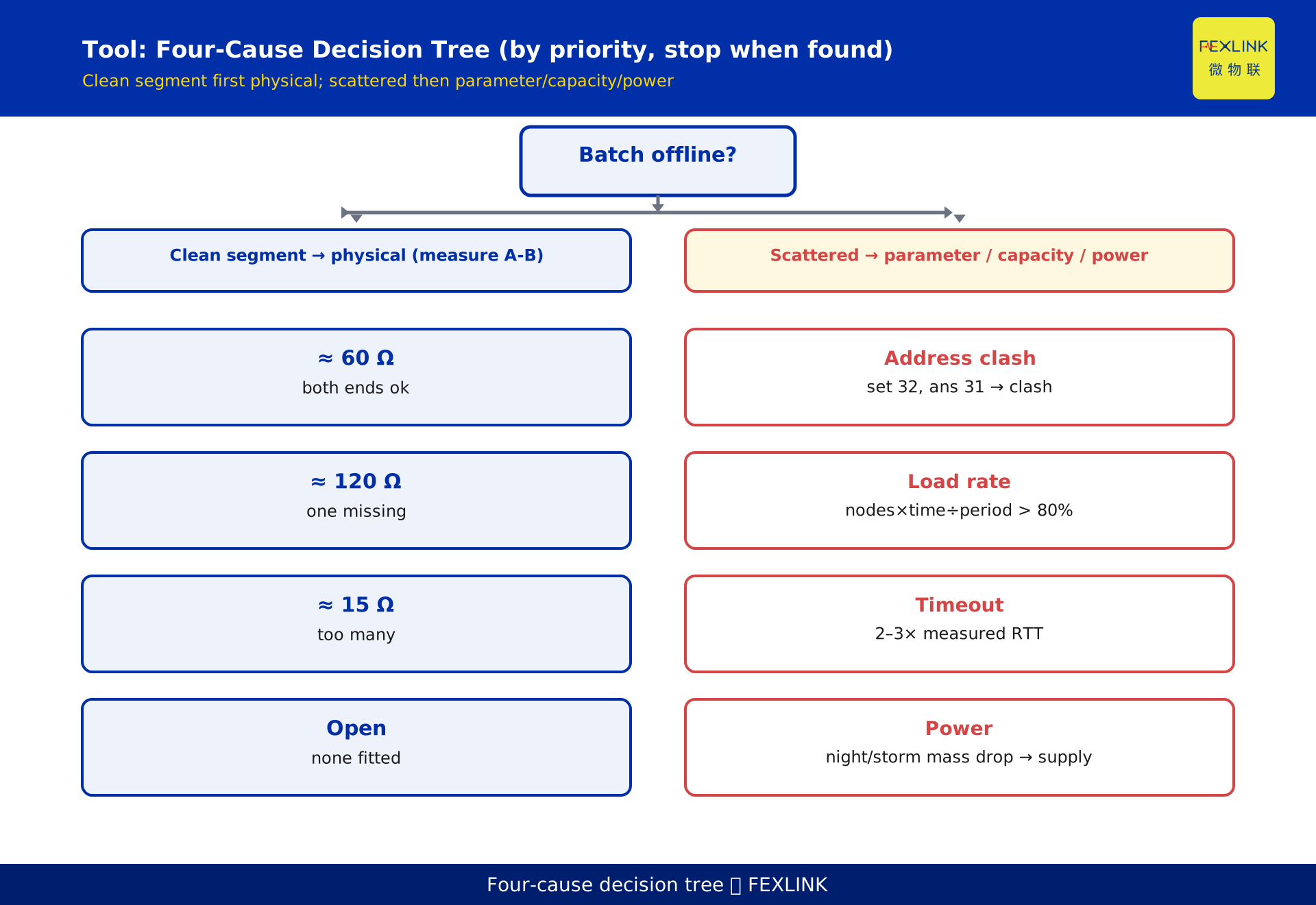
Do not troubleshoot randomly. Rank the four layers bottom to top; once a lower layer is confirmed, stop. The order follows "high frequency + one-minute confirmation on site": the physical layer is measurable by hand, the parameter layer checkable in configuration, the capacity layer needs a load calculation, and the power layer comes last.
| Priority | Layer | Typical sign | One-minute check |
|---|---|---|---|
| ① | Physical: topology / termination | a clean whole segment down | power off, measure A-B; look for star branch |
| ② | Parameter: baud / address conflict | some time out, address clash | reconcile address table; compare baud |
| ③ | Capacity: load and polling period | all up but slow, avalanche | compute comms load; inspect timeout |
| ④ | Power: supply / surge | mass drop at night or storm | measure local voltage; check protection |
The physical and parameter layers explain "why a whole segment is down"; the capacity layer explains "why it slows then collapses"; the power layer explains "why it drops in specific windows".
3. Physical layer: topology and termination (most frequent)
This is the first scene of batch offline. RS485 must be daisy-chained, never star-branched: an open branch end fully reflects the signal, and whether errors occur depends on where the reflection lands at the sampling point — a position that drifts with temperature, node count and supply, so a star-branched segment often works by day and collapses at night or after a device is added. Termination goes only at the two physical ends, one 120 Ω each; a middle node accidentally switched ON, or an end resistor removed during a retrofit, are both frequent.
The fastest confirmation is to power off and measure A-B resistance (a general engineering rule of thumb for RS485, not a standard clause):
- about 60 Ω: two 120 Ω resistors in parallel — topology and termination normal.
- about 120 Ω: only one terminator — end mismatch.
- far below 60 Ω (e.g. 8 meters all terminated ≈ 15 Ω): too many terminators, bus loaded down.
- open / very high: none fitted.
This one reading qualifies the physical layer; if it is not near 60 Ω, fix topology and termination first.
4. Parameter layer: baud rate and address conflict
If the physical layer is clean but batch timeouts persist, check the parameter layer.
Address conflict is the sneakiest. Duplicate addresses make two meters answer at once, or the platform treats two physical meters as one, showing "meters in a range appear and vanish, counts do not add up". Pull the gateway address map and compare configured count with actual responding count: 32 configured but 31 received, always in the same range, strongly suggests duplicates.
Baud deviation is subtler. Nominally equal, but crystal drift plus an over-long cable softens the edge and mis-samples at high baud; the sign is "all up but occasional CRC errors, occasional timeouts". Dropping the bus to 9600 bps as a comparison test, if the offline vanishes, points to baud / speed-distance mismatch, not a dead meter.
5. Capacity layer: gateway load and polling period
With physical and parameter layers excluded, if timeouts persist or avalanche, calculate the capacity layer.
Comms load = node count × per-round time ÷ polling period. Above 80% you get occasional timeouts; above 100% stable dropouts. The hidden killer is the timeout setting: one down node with a 500 ms timeout occupies the time of a dozen healthy nodes; two or three down can double one round, so more nodes time out queuing, triggering an avalanche.
Set timeout to 2–3× the measured round-trip time, not a blanket 1 s; split a long bus into short ones polled by separate serial ports so per-segment load falls. This is where gateway selection lands. The ESX-0223-GR edge computing gateway converts protocols and schedules polling at the edge, running each bus poll as an independent task and recording per-node timeout and CRC statistics; the CW industrial gateway is a wide-temperature, multi-port aggregator that collects dispersed buses before upstream delivery. Both show "which segment, which node failed first" from the platform, cutting location time.
6. Power layer: supply and surge
When the first three layers are clean but offline shows a time-window pattern — at night, in thunderstorms, or when equipment starts and stops — check the power layer. Field meters are mostly fed by local small supplies; supply voltage dropping below the limit, or a surge (lightning, large motor start-stop) entering the line, can reset or latch a whole batch at once. Such drops are often misread as "a comms problem", so the gateway gets rebooted repeatedly — but the root cause is electrical, not comms.
The remedy: measure the local supply under no-load and load to confirm it is within the meter's range; add surge protection and isolation at both ends of buses near frequent storms or large equipment. The power layer is last because it carries obvious time patterns and is largely exclusive of the other three.
7. The most common field truth behind "half offline": a segment was changed
Return to the opening claim — "half the batch offline is one bus segment restructured into a star branch, or duplicate addresses". Two common scripts.
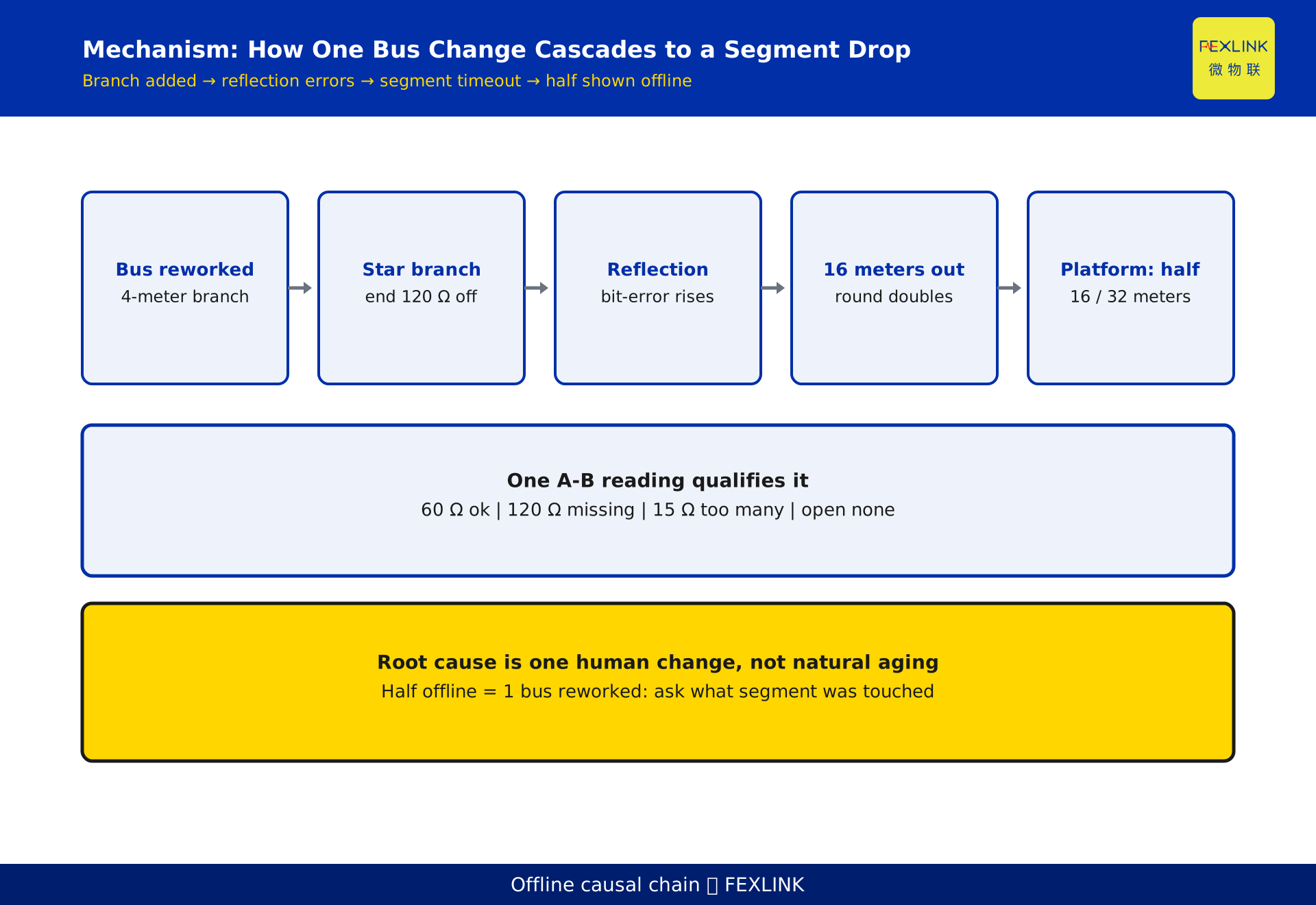
Script one: a clean half offline = one bus was reworked. A substation has 32 meters on two RS485 buses, 16 each. One day one bus drops all 16 at once; the platform shows "half down". The cause is that this bus was branched into a star mid-way (a new branch of 4 meters added), the open end reflects and the 120 Ω end terminator was accidentally removed, so the whole bus errors out. The A-B resistance then reads not 60 Ω but toward open or only 120 Ω — one measurement exposes it.
Script two: a whole address range lost = duplicate addresses. During a retrofit, new meters kept the old station numbers; polling that range triggers a fight, and the platform declares "this block is all down". Pull the address map and count responses, and the conflict range is located at once.
Both share one trait: the root cause is one human change, not natural aging. Ask first "what segment was touched, what meters were added" — far faster than pinging meters one by one.
8. The troubleshooting order and one-minute method
- Power off and measure A-B resistance: 60 Ω normal; 120 Ω one terminator missing; far below 60 Ω too many; open none fitted.
- Inspect topology: is the main line end-to-end, any star branch, how long the branches.
- Pull the address table / count responses: configured vs actual mismatch points to duplicate addresses; loss in one range narrows the conflict.
- Compute comms load: node count × per-round time ÷ polling period; above 80% adjust timeout or split the bus.
- Check supply and surge: mass drop with a time pattern — measure local voltage and inspect protection first.
Cross-check with error types: many CRC errors point to reflection and interference; many timeouts but occasional success point to topology, address conflict, baud deviation; all dead first check A/B reversed, DE/RE direction control.
9. How the gateway shortens location time
Troubleshooting need not mean climbing the cable well with a multimeter. Pushing diagnosis into the gateway saves many site trips.
Take the ESX-0223-GR edge computing gateway: it polls Modbus and converts protocols at the edge, recording each slave's last response time, timeout count and CRC errors. From the platform you see at a glance whether "nodes 1–16 on bus A timed out together" or "a few nodes flap occasionally" — the former points to the physical layer or an address range, the latter to capacity or power; it can also schedule polling per segment, shortening long buses structurally.
The CW industrial gateway fits multi-bus aggregation: wide-temperature, multiple RS485 ports, collecting short lines from several substations before upstream delivery, isolating faults per segment and making it easy to locate the incident segment by port.
In practice: before rebooting the gateway, export its node-health statistics. If one port or address range all times out, the root cause is in that segment and a reboot just wastes a site window; if scattered timeouts grow over time, it is mostly the timeout setting or load. Let the data speak first.
10. Frequently asked questions (FAQ)
Q: Half the meters are offline — will rebooting the gateway fix it?
Probably not. A reboot only re-scans nodes already down; the root cause (topology change, duplicate addresses, excess load) remains and they will drop again. Measure A-B resistance and pull the address table to see whether a whole segment or range is lost, then act.
Q: How do I quickly tell physical from parameter layer?
Power off and measure A-B resistance: about 60 Ω means termination is normal and the physical layer is largely clear, so move to addresses and baud; if the reading is 120 Ω, 15 Ω or open, fix topology and termination first.
Q: What are the signs of an address conflict, and how do I identify it?
Meters in one range appear and vanish, with the platform's responding count below the configured count. Compare "configured addresses" with "actual responses"; if the loss is always in the same range and the gap equals the number of added meters, it is a duplicate. Easiest during retrofits.
Q: How should I set the gateway polling period to avoid dropouts?
First compute comms load and keep it under 80%; set timeout to 2–3× the measured round-trip time, not a blanket 1 s. For long buses, split into several short ones polled by separate serial ports.
Q: After lowering the baud rate the offline vanished — is it fixed?
Lowering speed is only a diagnosis. Low speed tolerates longer cable and poorer high-frequency behaviour, temporarily suppressing reflection, but the root cause (star branch, missing termination, over-long distance) is untouched and returns when speed goes back up. It confirms the problem is physical, not that it is fixed.
Q: Can batch offline be located by the gateway alone, without a site visit?
Partially. The gateway records per-node timeout and CRC statistics and can distinguish "whole-segment timeout" (physical / address range) from "scattered timeouts growing" (capacity / power). Final confirmation (measure resistance, inspect topology, change addresses) usually still needs the site.
Scope and limitations
- This article discusses a fault-diagnosis workflow for batch meter offline events, applicable to RS485-based metering buses such as Modbus RTU; its four-layer decomposition and priority troubleshooting also apply to other half-duplex serial buses, but specific thresholds must be adjusted per protocol and medium.
- The RS485 physical-layer parameters referenced (120 Ω characteristic impedance, termination only at the two ends, A-B resistance about 60 Ω as normal, 120 Ω as one terminator missing, far below 60 Ω as too many, open as none fitted) are general engineering rule-of-thumb values of the RS485 system, established by the companion article on RS485 dropout fundamentals; they are not cited here as standard clauses, and specific figures depend on the transceiver data sheet.
- 1200 m (at baud not exceeding 100 kbps) is a common engineering upper limit of the RS485 system; the usable distance depends on cable, baud, node count and field interference and must be confirmed by measured bit-error rate; this article makes no distance or performance commitment.
- The "32 meters / 2 buses / 16 offline as a whole segment" and "new branch of 4 meters" figures in section 7 are constructed to illustrate the diagnostic feature of a "clean half offline" and represent no real customer, project or site; the actual topology is subject to field survey.
- The descriptions of the ESX-0223-GR edge computing gateway and CW industrial gateway (edge polling scheduling, multi-serial-port aggregation, node-health statistics) follow the latest selection manual and product knowledge base; this article is not a selection or procurement recommendation.
- This article cites no standard clause numbers; any specific figure involving metering or comms performance is labelled as an engineering rule-of-thumb or a constructed example and must not be applied directly to acceptance without measurement.
Frequently Asked Questions
Half Your Meters Show Offline
When a large batch of meters suddenly shows offline, do not rush to reboot the gateway — a reboot merely re-scans nodes already down