 微物联研究院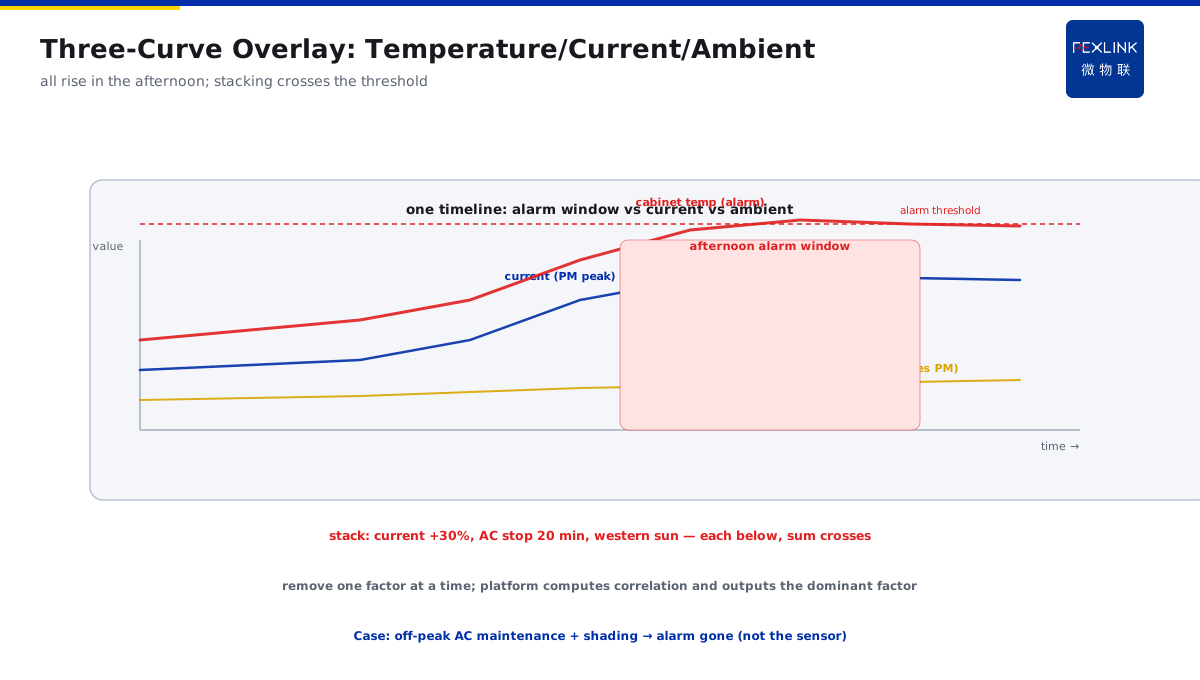
Direct Answer
A distribution cabinet alarms every afternoon but is normal in the morning — is the sensor false-alarming? The answer: troubleshoot by correlating with the time pattern — first check whether the afternoon load curve rises in step; then check whether the cabinet receives direct sunlight; compare the switchroom ventilation and air-conditioning duty. Patterned alarms are mostly environment-plus-load stacking, not sensor faults; draw temperature, current, and ambient data on the same timeline and the root cause usually becomes obvious.
A distribution cabinet alarmed every afternoon for a week and was normal in the morning; operations suspected a sensor fault but dared not remove it (fearing impact on operation). Plotting temperature, current, and ambient temperature on one timeline: at 13:00–16:00 load rose (afternoon production peak), the switchroom AC stopped intermittently in the afternoon (maintenance window), and the cabinet faced western sun. Three factors stacked and cabinet temperature crossed the alarm threshold. After shifting AC maintenance off-peak and adding shading, the alarm disappeared — not a sensor problem. For patterned alarms, look at the "three curves on one timeline" — temperature, current, environment together; the root cause reveals itself.
Because:
- A patterned alarm should be exploited first: a fixed-time alarm is a reproducible phenomenon — reproducible means a corresponding factor can be found;
- Rising afternoon load is the primary correlation: the afternoon production peak raises current and cabinet heating — check the load curve first;
- Sunlight and ventilation are stacking factors: western sun raises cabinet temperature; AC stops/poor ventilation trap the heat;
- Patterned alarms are almost never sensor faults: sensor false alarms are mostly random and patternless; a patterned alarm always has a patterned cause behind it.
Key insight: afternoon cabinet alarms are "finding the root cause in the pattern," not "suspecting the sensor." Overlay temperature, current, and ambient curves and the root cause is clear at a glance.
In one afternoon-alarm investigation, the load curve showed afternoon current 30% higher than morning (production), the switchroom AC auto-stopped 20 minutes at 14:00–15:00 for defrost (a seasonal phenomenon), plus western sun. Three factors stacked to cross the threshold. After handling, the alarm disappeared — removing the sensor would have been completely the wrong direction.
1. Using the Alarm Time Pattern
Step one for patterned alarms: quantify the pattern.
Record the pattern:
- Which period do alarms concentrate in (afternoon 13:00–16:00)?
- Fixed daily (weekdays alarm, weekends normal)?
- Duration and frequency (how many times a day, how long each)?
What the pattern tells us:
- Fixed period → related to period factors (load/sunlight/AC);
- Weekday alarms, weekends normal → related to production/load;
- Random all day → closer to random factors (sensor/transient interference).
How to use it:
- List "date–period–alarm count" (platform auto-statistics);
- Find the alarm's fixed pattern;
- Use the pattern to compare candidate factors (load, sunlight, ventilation).
Key insight: the pattern is a clue, not a conclusion. A fixed-time alarm necessarily corresponds to a period factor — quantify the pattern first, then find the match.
2. Comparing the Load Curve
For afternoon alarms, check the load curve first:
Load-curve correspondence:
- Does afternoon current rise (afternoon production peak)?
- Do the current-rise period and the alarm period overlap?
- Higher load means more cabinet heating (I²R).
How to compare:
- Overlay the current curve and alarm times on one timeline;
- Alarm period = load-peak period → load is the primary factor;
- Alarm period ≠ load peak → load is not primary; look at sunlight/ventilation.
Verifying the load factor:
- Do alarms disappear on weekends/holidays (low load)?
- Do alarms decrease after rescheduling production (avoiding the peak)?
- Once confirmed: shift the load, increase capacity, strengthen cooling.
Key insight: the load curve is the first comparison line. If the alarm follows load, solve the load–cooling match first; if not, move to sunlight and ventilation.
3. Sunlight and Ventilation Checks
Load does not match? Check sunlight and ventilation:
Sunlight checks:
- Does the cabinet receive western sun (afternoon direct)?
- Cabinet orientation (west/south)?
- Shading measures (canopy, insulation layer)?
Ventilation checks:
- Is the switchroom well ventilated (windows/fans)?
- Is the AC running normally (defrost stops, maintenance stops)?
- Are cabinet cooling fans working (fan fault)?
- Is anything stacked around the cabinet (blocking heat dissipation)?
How to compare:
- Sunlight: temperature of west-facing cabinet vs non-sunlit cabinet;
- Ventilation: temperature during AC-stop vs AC-running periods;
- Environment: switchroom ambient vs in-cabinet temperature difference.
Verifying environmental factors:
- Do alarms disappear on cloudy/rainy days (no sunlight)?
- Do alarms decrease when AC runs normally?
- Once confirmed: shade, improve ventilation, shift AC maintenance off-peak.
Judging three-factor stacking:
- Single factors below threshold, stacking crosses it — the most common patterned-alarm situation;
- "Turn off" one factor at a time and see whether the alarm disappears (load off-peak / shading / ventilation restored);
- Only after handling all three does the alarm truly disappear — do not stop after fixing one;
- The platform auto-computes "current–ambient–in-cabinet temperature" correlation and outputs the dominant factor.
Key insight: sunlight and ventilation are stacking factors. Rising load + western sun + AC stop — none exceeds the threshold alone, but they do together — look at all three together.
4. Disproving a Sensor False Alarm
Suspect the sensor? Disprove it with data:
Sensor-fault characteristics:
- Random alarms, no fixed pattern;
- No correlation with other points (only one point alarms);
- Abnormal value jumps (instant full-scale/zero).
How to disprove "not the sensor":
- Fixed pattern (period/weekday) → not the sensor;
- Changes in step with current/environment → not the sensor;
- Multiple points alarm or linked points move together → not the sensor;
- Adjacent point comparison (consistent multi-point trend in the cabinet) → sensor credible.
When to check the sensor:
- Patternless, isolated, value-jumping alarms;
- Multi-point comparison clearly abnormal (single point deviates greatly);
- Confirmed after inspection/replacement.
Detailed multi-point comparison:
- Place at least 3–5 temperature points in the cabinet (top/middle/bottom, air inlet/outlet);
- At alarm time, look at the multi-point trend: all rising in step = real heating (sensor credible);
- Only one point abnormal while others steady = that point's sensor suspect (check fixing/wiring);
- Adjacent equipment warming in the same period = environmental (whole switchroom hot);
- Record a "point–value–trend" comparison table; conclusions are evidence-based.
Key insight: patterned alarms can disprove a sensor fault. Patterned, in step with current/environment, consistent across points — the sensor is fine; do not remove it.
5. Environment Improvement vs Sensor Review
Once judged, the disposition direction is clear:
Environment/load direction:
- Shift production off-peak / adjust load periods;
- Shade (canopy, insulation film);
- Improve ventilation (fans, AC off-peak maintenance);
- Cabinet cooling checks (fans, duct cleaning).
Sensor direction (genuinely false-alarming):
- Check sensor fixing and wiring;
- Calibrate/replace the sensor;
- Review the measurement point (is the point reasonable?).
Verification:
- After environment improvement: the same-period alarm disappears;
- After sensor replacement: patternless alarms disappear;
- Monitoring returns to normal before restoring.
Key insight: dispose of environment first, sensor second. For patterned alarms, environment improvement comes first; only genuinely patternless alarms warrant sensor review — do not reverse the direction.
6. Product Landing: Afternoon-Alarm Diagnosis
FEXLINK products bring afternoon-cabinet-alarm diagnosis to the field:
- EST Multi-Channel Temperature Controller: multi-point in-cabinet temperature acquisition (multi-point trend comparison disproves the sensor);
- FEXLINK-BMS Busbar Monitoring System: busbar temperature + current monitoring, load and temperature on the same axis;
- ESX Edge Computing Gateway: temperature, current, and ambient curves auto-overlaid; patterned alarms auto-attributed;
- The platform outputs "suspected load / sunlight / ventilation / sensor" conclusions; maintenance executes in order;
- Alarm records auto-statistics by "date–period" — the pattern is clear at a glance.
Design principle in one sentence: turn "suspect the sensor" into "find the root cause on a three-curve overlay." Pattern, load, environment — the platform gives the comparison; the root cause cannot escape.
7. Common On-Site Mistakes
- Suspecting the sensor at the first alarm: removing the sensor immediately. Consequence: it was environment stacking; removal wastes effort and affects operation. Correct: patterned alarms — find the pattern factor first.
- Looking only at temperature, not load: not comparing the current curve. Consequence: the load factor is missed. Correct: overlay temperature and current on the same axis.
- Ignoring environmental factors: western sun and AC stops not considered. Consequence: no single factor exceeds the threshold, yet the stack does — and it is not found. Correct: look at load + sunlight + ventilation together.
- No multi-point comparison: concluding from a single-point alarm. Consequence: the sensor question is not excluded. Correct: consistent multi-point trend → sensor credible.
- Reversed disposition: replacing the sensor for an environmental issue, or adding shading for a sensor issue. Consequence: the problem persists. Correct: environment first, sensor second, classify by pattern.
Scope and Limitations
This article discusses diagnosing "patterned afternoon temperature alarms" in distribution cabinets (time-pattern use, load comparison, sunlight/ventilation, sensor disproval) for cabinets/switchrooms in service. The judgment methods are engineering experience references; actual practice follows cabinet type, load characteristics, and site environment. Sensor calibration involves inspection and must follow procedures by qualified personnel. Environmental improvements (shading, ventilation retrofits) require assessment against actual conditions. Online monitoring data is managed uniformly through the platform to form trend alerts. All cases are anonymized (a certain cabinet / plant) and do not refer to any specific customer.